NEW TRIPTokyo, JapanJPY → AUD
Give your trip a budget.
Pick the dates, your home currency and your travel currencies. Choose a whole-trip or daily budget.
Track each trip, spend in local currencies, and always know the real total back in your home currency.
Your trips, budgets and spending stay private to your account. Secure sign-in and account-level protection help keep your travel data safe.
We sent a confirmation email to . Confirm it, then come back here and sign in.
Keep each holiday or journey separate, with its own budget and expenses.
Record expenses in your travel currency and see them in your home currency.
Stay close to your budget with daily allowances and spending insights.
Coffee, train tickets, a few nights away. Keep each expense with its trip and see the total in your home currency.
View your budget, spending and days left together. Skip the spreadsheets and currency maths.
≈ €19.06 in this example
Expense tracking should take seconds, not time away from the trip.
Pick the dates, your home currency and your travel currencies. Choose a whole-trip or daily budget.
Enter an amount, choose its category and add a note. It all stays attached to the right trip.
Explore categories, daily spending and budget pace so there are fewer surprises.
Watch the Lisbon example, or jump to the step you need.
21 seconds. Silent video. Illustrated setup preview of the New trip screen.
The preview uses €1 = A$1.78, with rounded figures. These are example amounts, not a current exchange rate. After saving, “Lisbon May 2027” appears in Your trips.
Everything you need to stay organised when the currency, the city and your plans keep changing.
Spend in euros, yen or baht. Compare expenses using your home currency.
Use a trip budget or daily budget and follow your remaining allowance.
Understand which categories cost the most and which days were busiest.
A calculator-style entry screen, categories, notes and payment methods.
Switch between past and present trips without mixing their expenses.
Sign in to access your synced trips and spending on your devices.
Invite your partner or friends to add and edit expenses in the same trip. Everyone uses their own account, and your other trips stay separate.
Save your trip → Edit trip → Share trip
See how shared trips work ↗
Your categories give each expense a colour and an icon. Tap into a category from Insights to see the expenses behind it.
Travel plans change. Keeping track of your spending shouldn't be complicated.
Yes, it’s free to use during our early-access period while we gather feedback. If that changes later, we’ll tell users clearly.
No. Expense Travel App is built for entering your travel expenses yourself, so there's no bank connection needed.
Yes. Use Share trip to invite your partner or friends with a link. Everyone joins with their own account and can edit that trip’s expenses. Read the shared-trip guide.
Yes. Create separate trips with their own dates, budgets, currencies and expense histories.
Choose your home currency and the currencies you use while travelling. Expenses are converted into your home currency using the trip's exchange rates, which you can also adjust. Read why the total may differ from your bank statement.
Yes. Open an existing expense to update its amount, category, date, payment method or description.
You can add Expense Travel App to your iPhone Home Screen from Safari and use it as a web app.
Should an ATM withdrawal count as spending? Learn how to record cash purchases and fees without counting the same money twice.
Read the ATM withdrawals guide ↗Browse travel budget guides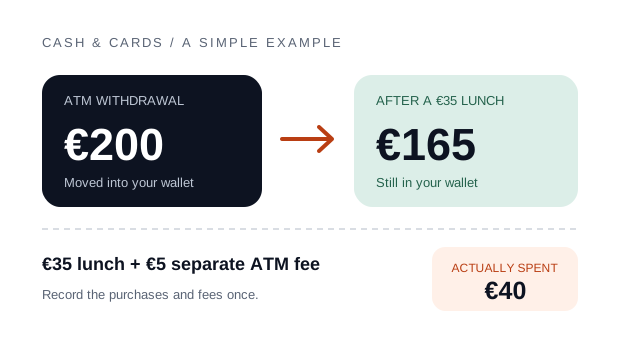
Your next boarding pass to less budget guesswork.