
Your travel app and your bank may use different exchange rates. Fees, currency conversion at the payment terminal and rounding can also change the result. Use the app to follow your budget, and the final bank entry to check what your account was actually charged.
You record a €50 dinner, then notice that the Australian-dollar total in your travel app does not match your bank statement. It does not necessarily mean you entered the purchase incorrectly.
The receipt shows what you bought in local currency. The app shows a converted value for budgeting. The bank shows the charge processed under your card’s terms. Understanding those three amounts makes the difference easier to check.
One purchase can have three different amounts
- The local price: the amount paid to the merchant, such as €50.
- The app’s converted value: the local price converted using the rate saved in your trip or expense tracker.
- The final account cost: the bank’s converted purchase amount, plus any separate fee.
The first amount describes the purchase. The other two describe how that purchase is expressed in your home currency. They can differ without being separate expenses.
A €50 dinner: app estimate versus bank charge
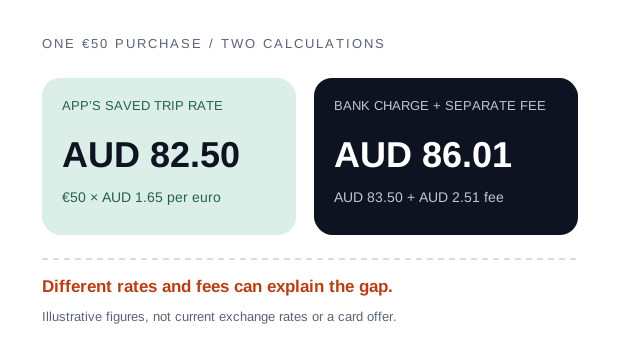
Suppose the saved trip rate is AUD 1.65 for each euro. Your €50 dinner appears as AUD 82.50 in the app.
Now suppose the card charge uses AUD 1.67 per euro, and the bank adds a separate 3% foreign transaction fee. These are hypothetical figures to show the calculation, not current rates or a particular card’s pricing.
| Calculation | Amount in AUD |
|---|---|
| App: €50 × 1.65 | $82.50 |
| Bank purchase: €50 × 1.67 | $83.50 |
| Separate bank fee: 3% of $83.50, rounded | $2.51 |
| Final account cost: $83.50 + $2.51 | $86.01 |
The difference is AUD 3.51. One dollar comes from the different rate, and AUD 2.51 comes from the fee. Some card statements show fees separately; others may present charges differently. Check your own issuer’s terms and posted entries.
Why the exchange rates can differ
Your app uses a saved or reference rate
A travel tracker may use a reference rate, a manually entered rate or a rate saved when you set up your trip. That rate does not automatically match the conversion applied to every card purchase.
ExpenseTravel uses saved trip rates to convert expenses into your home currency. You can refresh or adjust them through the app’s currency controls; our budget and exchange-rate help explains the settings. It is not connected to your bank and does not import the bank’s final charge.
Your card uses its own conversion process
The rate can depend on the card network, your issuer and when conversion takes place. Mastercard explains that its rate normally relates to authorisation, with a processing-time rate used when conversion cannot happen at authorisation. It also says banks may use other rates or impose fees. That does not establish a single rule for every card.
If a transaction is still pending, wait for the final posted entry before trying to match it exactly. Read your issuer’s explanation of foreign-currency transactions rather than assuming the purchase date and conversion date are always identical.
Fees and home-currency payment offers
A foreign transaction fee is a cost in addition to the purchase when the bank charges it separately. Record it once if you want your budget to include that cost. Do not add another fee if it is already included in the amount you entered.
A shop or ATM may also offer to charge you in your home currency. This is called dynamic currency conversion. The conversion offered by the merchant or ATM can include its own rate and fees, so it may differ from the rate your app uses.
Visa says that the conversion offer should show both currencies, the exchange rate and any additional fees or markup. Review those details and make your own choice; do not assume a home-currency figure on the terminal is the same as your app’s estimate.
For cash, separate the withdrawal principal from purchases and fees. Our guide explains whether ATM withdrawals should count as travel expenses.
Can refreshing a rate change old totals?
In ExpenseTravel, home-currency values are calculated from the expense amount and the trip’s saved rate. Changing that trip rate can therefore change the displayed value of existing expenses in the same currency.
The original local-currency purchase amount stays the reference for that entry. A changed Australian-dollar total does not mean the café changed its price.
If your card used different rates on different days, changing a shared trip rate to match one purchase can move the converted values of other purchases. Use it consistently for budgeting, rather than treating it as exact bank reconciliation.
A quick check before changing your records
- Check the original amount and selected currency against the receipt.
- Check the trip’s home currency and saved exchange rate.
- Compare the final posted bank entry, including any separately charged fees.
- Check whether the terminal converted the purchase into your home currency.
- Look for duplicate entries or a fee counted twice.
Small differences can also come from rounding individual converted amounts. There is no universal percentage that makes a mismatch acceptable. Investigate anything you cannot explain.
If you need to record the exact amount charged, you can enter the final purchase amount in your home currency and put the original local price in its note. Replace the original expense rather than adding the same purchase again. Add a separately charged fee once, or use one combined amount that already includes it. Do not do both.
For help with currencies and editing entries, visit ExpenseTravel support.
Common questions about currency totals
Should I record the local price or the bank’s final amount?
Use the local price for a consistent trip-budget estimate. Use the final home-currency amount if your priority is recording the exact posted charge. Keep the original price in a note and use one approach per entry so you do not duplicate the purchase.
Does a difference mean the app’s rate is wrong?
Not necessarily. It may be a different saved/reference rate, a card charge converted at another rate, a separate fee or rounding. Check the currency and original amount first.
Will refreshing my trip rate make every expense match my statement?
No. A shared trip rate cannot necessarily reproduce transaction-specific rates and fees. In ExpenseTravel, refreshing it can also change existing home-currency totals.
Should I log an ATM withdrawal to make the bank totals match?
Not as an extra expense if you also record the cash purchases. A withdrawal moves money into your wallet. Record actual purchases and fees once; see the ATM withdrawal guide.
For bookings paid before departure, decide whether prepaid flights and hotels belong in your daily allowance before comparing the numbers.
Read Should ATM withdrawals count as travel expenses? or browse the travel budget guides for practical examples.
Sources and scope
This guide explains personal travel-budget records. Card fees and conversion processes depend on your provider. All example rates and fees are illustrative.